Wednesday, June 13, 2012
Take Care Of My Heart Extras!
The following extras were made using
The kit Little Mrs Debbie from
Wicked Princess Scraps
get it HERE.


Tuesday, June 12, 2012
Skull Princess Extras and Cluster Frame Freebie!
The following extras and matching frame were made using
The kit Skull Princess from
Wicked Princess Scraps
get it HERE.


I hope you enjoy these!

*The creations that I make whether they are a tag, forum set, or quick page or extras are made by me and my own creativity and imagination. Please do not rip apart, destroy, alter them or claim them as your own. If you do any of these things you are committing an infringement and going against copyright laws. If caught you will be reported to the licensing companies.
Sunday, June 10, 2012
Love Is Tutorial and Extras! PTU TUT

Supplies Need:
Tube of choice: Love Spell by Zindy. Find it HERE.
Scrap kit: Luv U Mom by Dees'Sign Depot. Find it HERE.
Eye Candy Gradient Glow HERE
Chopin Script Font HERE
So, let's begin!
Open up Element 13 [stitched heart frame] copy it and paste it as a new IMAGE, close the origional, make your canvas size pretty large here so we have enough room to work
>image>canvas size>1600x1300.
add shadow:
V: 0 H: 1
O: 86 B: 3
Open up Element 23 copy it and paste as a new layer on top of the heart frame.
Open up Element 76 copy it and paste as a new layer beneath the butterfly, resize by 45%.
add shadow:
V: 0 H: 1
O: 86 B: 3
Open up Element 29 copy it and paste as a new layer beneath the butterfly and rose
Open up Element 63 copy it and paste as a new layer beneath the butterfly and rose and ribbon.
Open up Element 3 copy and paste it as a new layer beneath the first frame...on the very bottom.
Add your tube, I used Love Spell tube by Zindy.Copy and paste the close up image into a new layer BENEATH the heart frame.
Tazke your lasso and circle the very top part of the tube's head [whatever area you want to over lap the top frame] >SELECTIONS>PROMOTE SECTION TO LAYER
now move this layer on to the very TOP of the frames.
Open up Element 4 copy it and paste as a new layer on the very bottom.
Open up Element 28, rotate it 10 degrees to the left, copy it and paste as a new layer on the very bottom..angling it tward the top left area.
Open up Element 26 copy it and paste as a new layer on the very bottom...position it to the right near the edge of the heart.
Open up Element 6 copy and paste it as a new layer on the very bottom, position to the lower right of the heart frame, add gradient glow using the following settings:
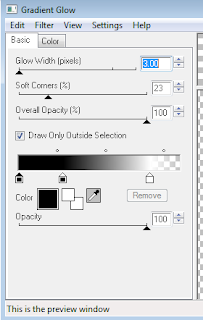
Open up Paper marked Glitter 2 [light grey] copy and paste as new layer on the bottom beneath the square frame we just put down..Grab your lasso tool and trace out the shape of the
square on this layer, >SELECTIONS>INVERT>EDIT>CLEAR.
Open up Element 5 copy and paste it as a new layer on the very bottom, move it to over lap the glitter paper we just cut out.
Grab your lasso tool and trace out the shape of the
square on this layer, >SELECTIONS>INVERT>EDIT>CLEAR.
Now crop down as close to the edges as possible without cutting anything off but leave room to add your tube in...resize to 700 on the largest side.
[You can go smaller size on this if you prefer]
Open the Word Art, copy and paste as new layer on top of the tube placing it as I have it show here, I also applied a gradient glow to it with Eye Candy 4000...just like the settings before on the 1st frame.
Add your watermarks and copyright info.
I also used the same gradient glow on the name as I did with the word art, positioning it on the top left edge of the tag.
Save and you are done!
If any part of your tag is blurry you can clear it up by sharpening the layer >adjust>sharpen.
I hope you have enjoyed this tut.


*The creations that I make whether they are a tag, forum set, or quick page or extras are made by me and my own creativity and imagination. Please do not rip apart, destroy, alter them or claim them as your own. If you do any of these things you are committing an infringement and going against copyright laws. If caught you will be reported to the licensing companies.
Summery Beauty Extras!
For these beautiful extras I used the poser art of Batschi Poser Design.
You can find this tube I used in this tag, "Hayden" HERE.


Thursday, June 7, 2012
Bitch Attitude Extras!
For these bitchin' extras I used the kit "Punketa" by Bibi's Collections.
Find it HERE.


*The creations that I make whether they are a tag, forum set, or quick page or extras are made by me and my own creativity and imagination. Please do not rip apart, destroy, alter them or claim them as your own. If you do any of these things you are committing an infringement and going against copyright laws. If caught you will be reported to the licensing companies.
Friday, June 1, 2012
Toes in the Sand Cluster Frame Set Freebie!
This summery set was made using The Toes In The Sand kit from
Jackie's Jewel's
get it HERE.
I hope you enjoy these!

it's a little smaller in preview than actual size.
*The creations that I make whether they are a tag, forum set, or quick page or extras are made by me and my own creativity and imagination. Please do not rip apart, destroy, alter them or claim them as your own. If you do any of these things you are committing an infringement and going against copyright laws. If caught you will be reported to the licensing companies.
Rustiq Luv Cluster Frame Set Freebie!
This set was made using The Rustiq Luv kit from
Karra's Kreative Korner
get it HERE.
I hope you enjoy these!

it's a little smaller in preview than actual size.
Tuesday, May 29, 2012
Gothic Lolita Tutorial & Extras!

Supplies Need:
Tube of choice: Gothic Lolita by Cute Loot. Find it HERE at The PSP Project.
Eye Candy Gradient Glow HERE

---------------------------------------------
So, let's begin!
Open up SCALLOPEDSQUAREFRAME copy it and paste it as
a new IMAGE, close the origional, make your canvas size pretty large here so we have enough room to work >image>canvas size>1600x1300.
Add a black gradient glow with the following settings:
Open HEARTFRAME copy it and paste it as a new layer, placing it on the right hand side near the upper corner. Add black gradient glow, same as previous layer.
Take your lasso tool and "trace" inside the heart frame, edit>clear.
Open flower 2 copy it and paste it as a new layer, placing it near the bottom edge of the heart, add drop shadow:
V: 1 H: 1
O: 100 B: 3
Open the black wings, it is marked as purse 3, copy and paste as new layer under the flowers we just did. Now cut away the left wing with your lasso tool.. we just want the left one showing.
Open cross 2 copy and paste it as a new layer, rotate to the left 10 degrees... place it near the left hand side near the bottom edge.
Add gradient glow with same settings as we used before only use one of the pinks from the tube.
Open heart scatter, resize by 50%, copy and paste as new layer beneath the cross, add drop shadow:
V: 1 H: 1
O: 100 B: 3
Open paper 2, copy and paste as new layer, send it to the bottom. Grab the magic wand tool, go to the heart frame layer click in the center of the layer, selections>invert>modify>contract 10.. now go to the paper layer, edit>clear.
Open tube, Gothic Lolita by Cute Loot..copy and paste as new layer on top of the paper we just cut, grab magic wand, selections>select all, click on the heart paper now go to the tube and hot contro+shift+p to make this selection a new layer... you may delete the other.
Open paper 4, copy and paste as new layer, send it to the bottom. Grab the lasso tool and "trace" around the square frame, selections>invert>modify>contract 10> edit>clear.
Now crop down as close to the edges as possible without cutting anything off but leave room to add your tube in...resize to 700 on the largest side.
[You can go smaller size on this if you prefer]
Open the Word Art, copy and paste as new layer on top of the tube placing it as I have it show here, I also applied a gradient glow to it with Eye Candy 4000...just like the settings before.
Add your watermarks and copyright info.
I also used the same gradient glow on the name as I did with the word art, positioning it on the top left edge of the tag.
Save and you are done!
If any part of your tag is blurry you can clear it up by sharpening the layer >adjust>sharpen.
I hope you have enjoyed this tut.


*The creations that I make whether they are a tag, forum set, or quick page or extras are made by me and my own creativity and imagination. Please do not rip apart, destroy, alter them or claim them as your own. If you do any of these things you are committing an infringement and going against copyright laws. If caught you will be reported to the licensing companies.
Monday, May 28, 2012
Emo Princess Extras!!
For these summery extras I used the kit "Emo Princess" by Bibi's Collection, find it HERE.
As you can tell, this is jam packed with lots and lots of elements!
You can find the tube HERE at SATC.. VIP membership is required.


Friday, May 11, 2012
Summer Memories Extras!
For these summery extras I used the new kit "Summer Cocktail" by Bibi's Collection, find it HERE.
As you can tell, this is jam packed with lots and lots of elements!


*The creations that I make whether they are a tag, forum set, or quick page or extras are made by me and my own creativity and imagination. Please do not rip apart, destroy, alter them or claim them as your own. If you do any of these things you are committing an infringement and going against copyright laws. If caught you will be reported to the licensing companies.
Subscribe to:
Posts
(Atom)
I Support:


My Blinkies

My Other Blogs

I Create For


Tut Writers Inc.


